Part 1
So, as I seem to always feel this time of year, I’m a bit behind. The day after I got back from Mobility Field Day 12, 500 new AP-635s landed in our receiving room (ahead of schedule) and we started swapping them out the following Monday. The 5 of us do this live, during the day, hoping to cause minimal disruptions. Then another 500 APs dropped a few days after we finished those, and we didn’t finish that batch until December 23rd.
Mix that with 2 of 3 kids having December birthdays, Christmas, and all the other parts of my full-time role that were kind of pushed to the side for the AP replacements, and I’m over a month behind everyone else’s posts. I also have a few other posts I need to start or finish in the next bit too. Luckily, we have a small reprieve until the next 1000(!!!) APs land, so I’m taking some time to write.
Now, this won’t include everything that was presented at #MFD12, just some of the things that stood out for me. If you’d like to watch everything that happened, you can head to https://techfieldday.com/event/mfd12/ which has links to all the videos.
#MFD12 was my first chance to be part of a Field Day event (long time listener, first time caller 😊) and it was an amazing whirlwind of an experience.
Mechanical issues on my 5am flight had me landing about 6 hours later than originally planned, causing me to arrive at the hotel 30mins before we were supposed to meet up for out meet-and-great event, but I made it on time.
The next morning we started nice and early with a presentation by Cisco.
Cisco started off by mentioning the new Wi-Fi 7 In Depth book. I had just started reading it before this trip and can say it’s a really great guide to Wi-Fi 7. Highly recommend.
https://www.amazon.com/Wi-Fi-Depth-deployment-Networking-Technology/dp/0135323614
Some of Cisco’s first big announcement included their new simplified licensing model and their three new Wi-Fi 7 APs: the CW9176I, CW9176D1 (Integrated directional), and CW9178I. They are part of a single AP solution where the APs work for both on-prem and cloud networks. And there are no more regulatory domains!
So, you buy the license level you want, buy the AP model you need, and then the AP works in your environment. The APs can even figure out if they should be in Catalyst or Meraki mode once connected to your network. Or you can do this manually if you prefer AND they can be switch between modes as many times as you need. They are also unlocked and can be moved between locations by you. All this equals less TAC calls 😊.
The APs even reboot into unified mode. They have included a QR code on the device to shows you how to do this. And no need to worry because they can still be put into site survey mode (not unified yet but coming).
The new Cisco Wi-Fi7 APs:
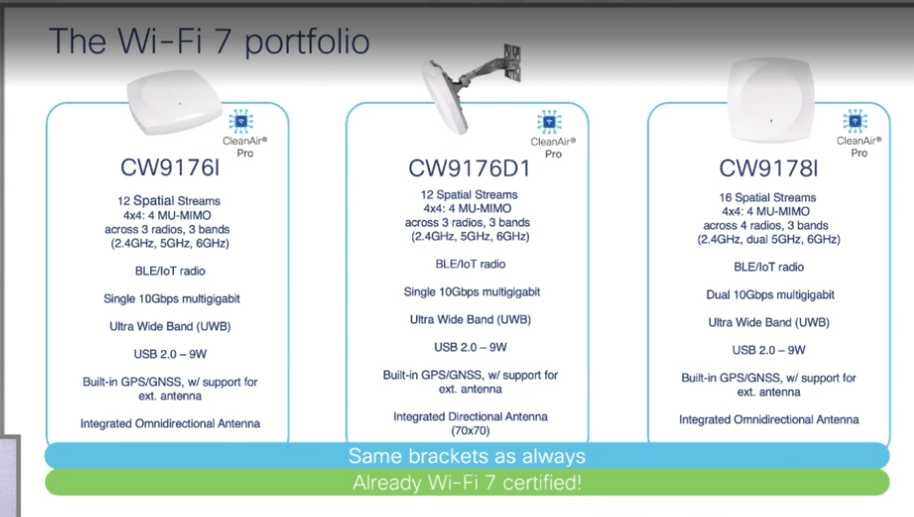
Things I liked most about the new APs:
- The APs can run in Dual 5GHz + 6GHz mode for sites that do not require 2.4GHz. As part of this, the 5GHz radios are locked with one operating in the upper and one in the lower end of the band. And it was confirmed that the upper 5GHz radio will not interfere with the lower 6GHz band.
- The CW9178I offers quad radios! So, you get to keep your 2.4GHz + Dual 5GHz + 6GHz.
- They offer built-in GPS for AP locating and AFC.
- The APs can tell how they are oriented with built in accelerometers.
- Mounting brackets stay the same.
- Unified site survey mode is on the road map.
Next, they covered some MLO.
**I did not know this until Nick mentioned it but Wi-Fi 7 Enterprise is not supported on Windows 11 right now. The device will associate but can not do MLO unless you go back to the pre-release version of windows 11. So, if anyone out there is planning to deploy Wi-Fi 7, you may want to keep this in mind. Hopefully a patch will be coming out soon.
Important MLO acronyms to know:
MLSR = Multi-Link Single Radio
eMLSR = enhanced Multi-Link Single Radio
STR = Simultaneous Transmit and Receive
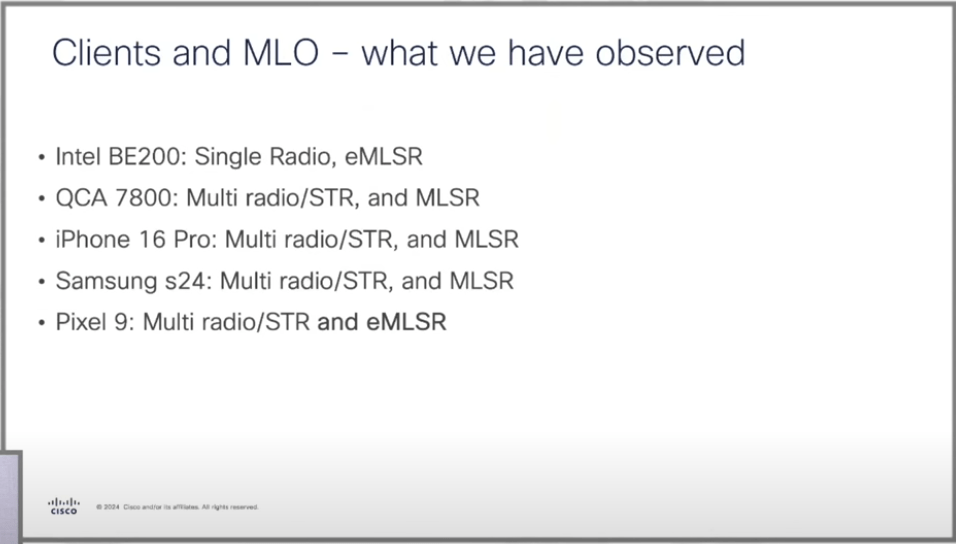
Client capabilities:
Fun Fact: You can use transition mode in Wi-Fi 7 if you have one common AKM across all 3 bands. *OWE transition is not valid with 6GHz and Wi-Fi7.
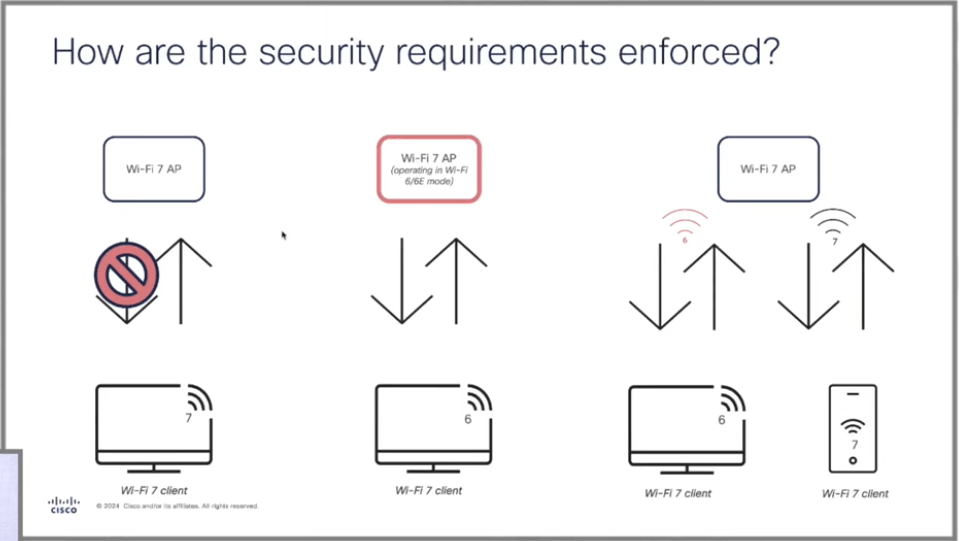
The middle option above shows a situation where you would choose to lower the Wi-Fi 7 AP to 802.11ax because of client capabilities or if you are not ready to implement things like OWE or WPA3. It shows that the downgrade is set by admins and not dynamic based on client capabilities. Lower capable client cannot cause APs to downgrade. So, if needed the Wi-Fi 7 APs can be run as 802.11ax.
The goal is to get to the 3rd option which will allow both 802.11be and 802.11ax clients to connect at the same time without having to lower the AP capabilities to accommodate the ax client like in the middle example. The capabilities are broadcast at the SSID level and ax clients will connect as 802.11ax while the be clients will still connect as 802.11be.
We were told that “roaming between Wi-Fi 7 and 6 should work seamless” with the caveat that there will always be clients that don’t behave as they should …which we are all well aware of by now.
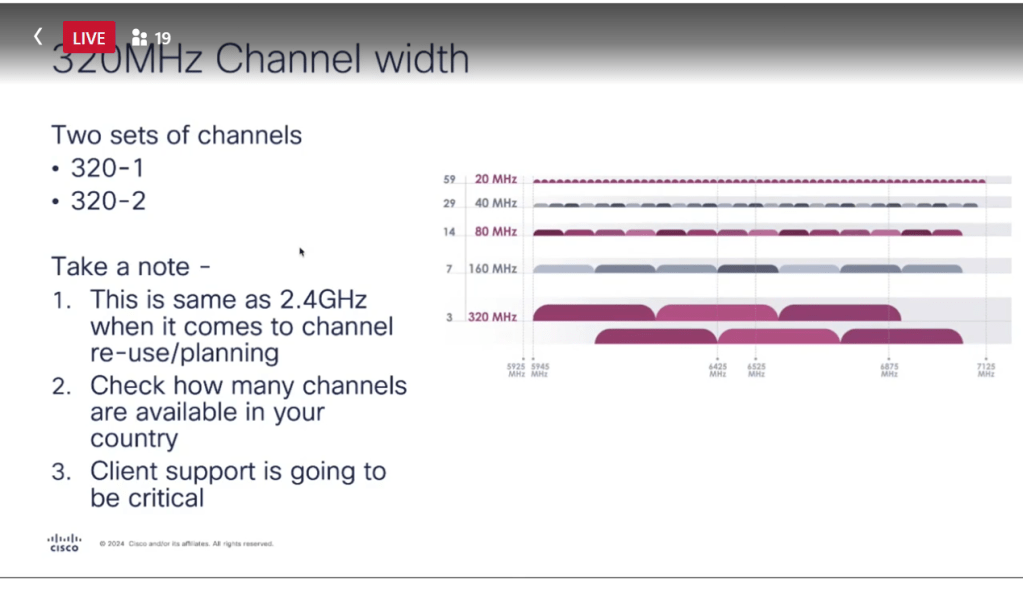
Next came some conversation on 320MHz channels. I liked that they were very real world about this. A lot of times I find it presented as an amazing, must use capability, but having only 3 channels (max) feels like 2.4GHz all over again. I’m in the 40 is the new 20 group 😊. Maybe 80MHz if you don’t have a lot of channel planning to consider.
And as mentioned in the slide below, how many clients do you have on your network that could even use the 320Mhz channel?
Don’t get me wrong, 320MHz is super cool but there’s probably not a huge number of environments where it would be very useful right now.
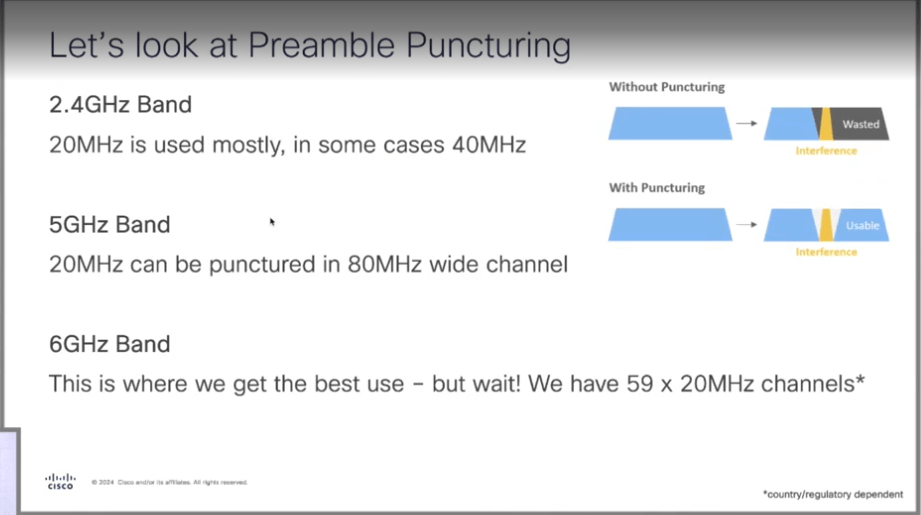
After this was preamble puncture. I work in an environment where we are about halfway through rolling out our 802.11ax APs, so while I’ve read and watched lots of things on preamble puncture, it’s not something I’ve had a chance to work with yet. I think this is part of why I find it so interesting.
The basic example of preamble puncturing is (see pic in slide below) if you were using an 80MHz channel and one of it’s 20MHz channel has a DFS hit/interference, it will just remove that 20MHz channel from the equation and continue with the rest of the channel width without having to change channels or drop to say a 40MHz channel. Super cool feature and probably most valuable in 5GHz because you a) should only be using 20MHz channels in 2.4GHz , and b) there’s not a lot of known interference or DFS channels in the 6GHz band at this time.
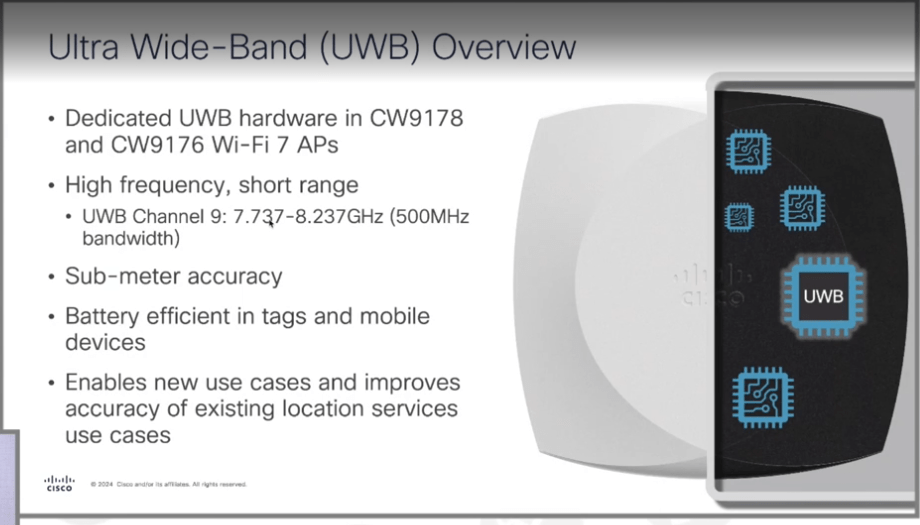
The next big thing was the announcement that the Cisco Wi-Fi 7 APs have dedicated hardware for UWB (Ultra Wide-Band).
UWB is high frequency and short range. It has a range of about 20-30 meters but depends on the environment and devices. It is usually used for industrial tracking and location services. UWB is more accurate than BLE or Wi-Fi. Those can get you close, but UWB gets you sub-meter accuracy.
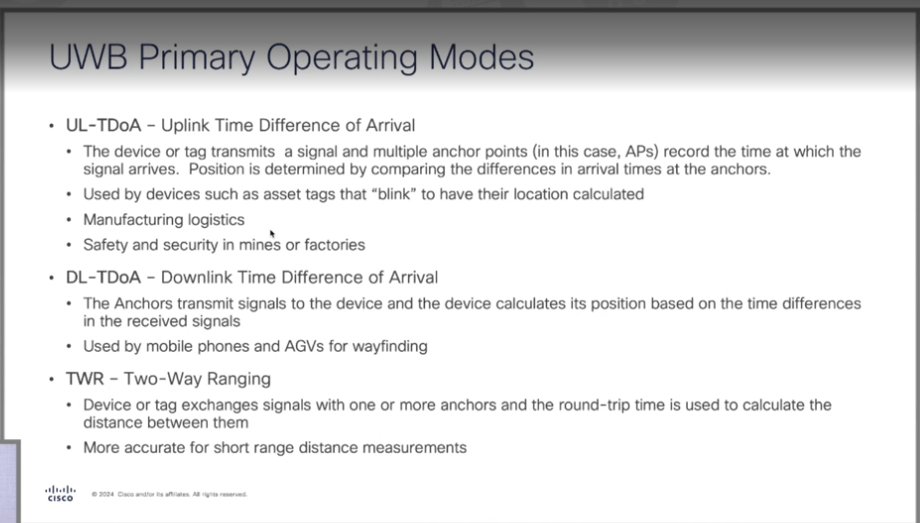
Below are the primary operating modes of UWB:
Visual of what the 3 operating modes look like:
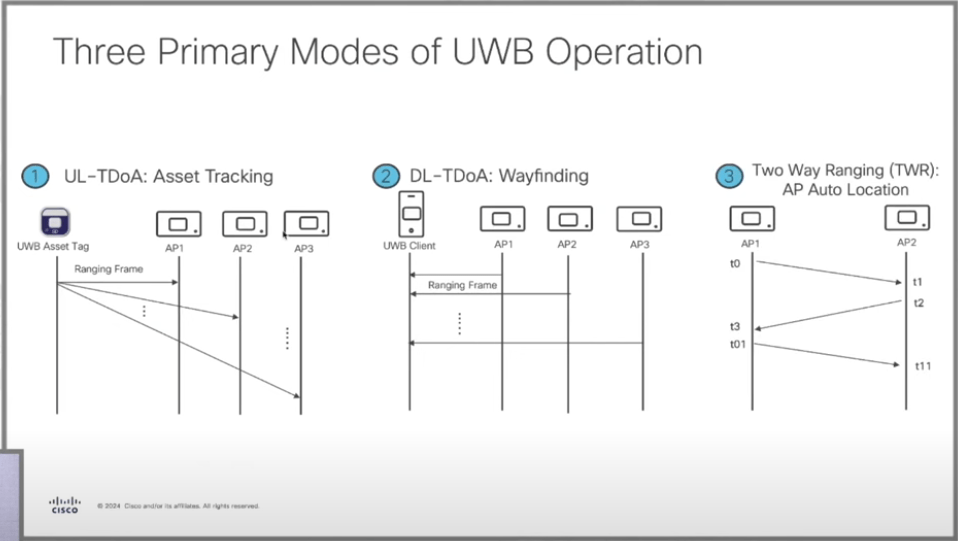
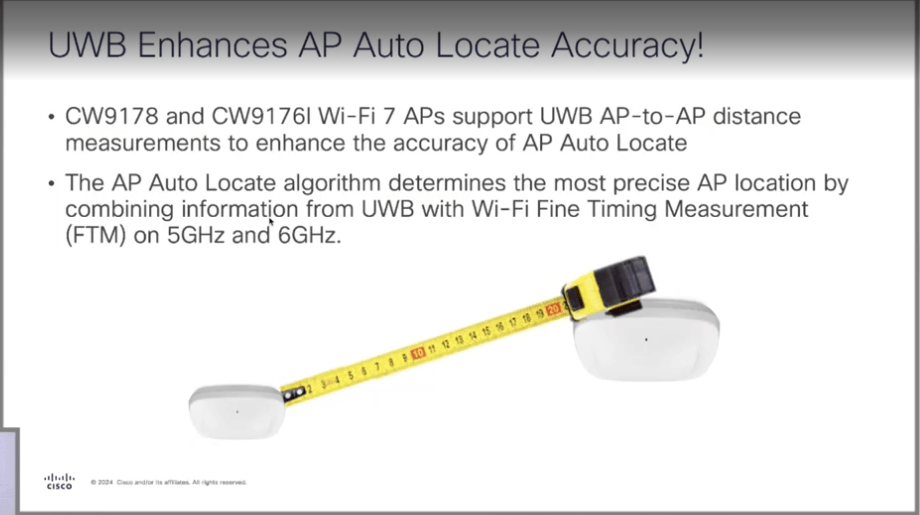
UWB is also being used to improve auto-locate compared the current FTM (Fine Timing Measurement) for AP-to-AP location. Best part is that one license gives you both FTM and UWB. You don’t have to choose. Whatever you enabled will be used.
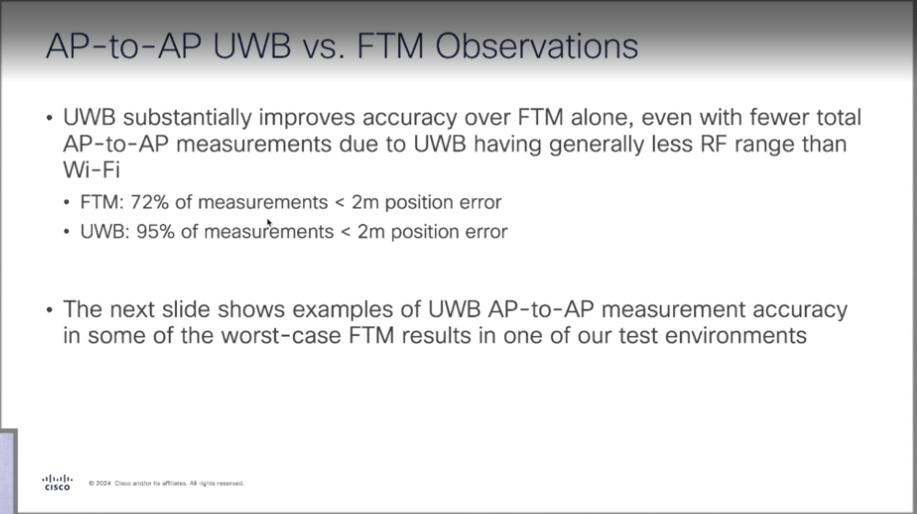
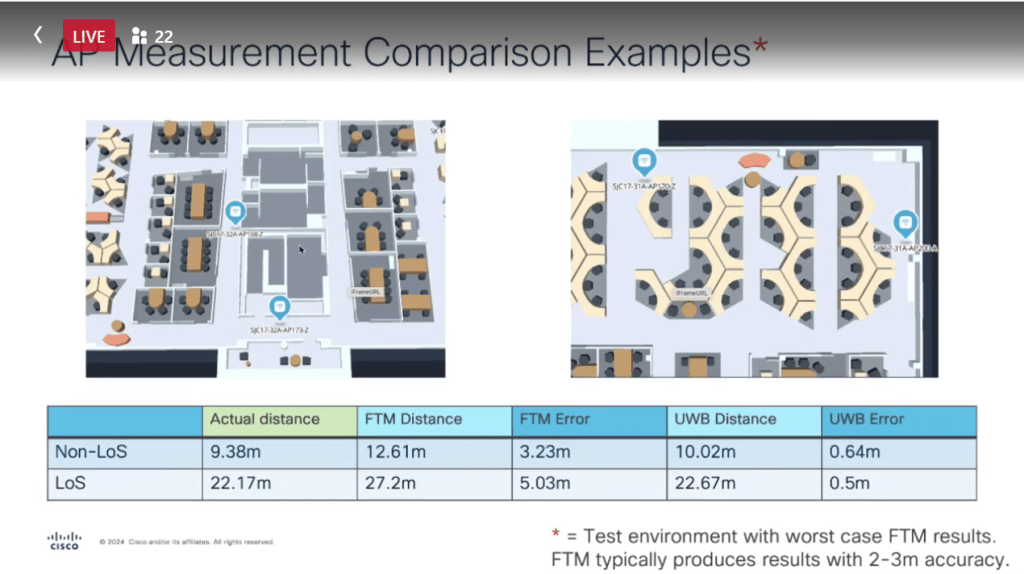
Below is the visual example used to compares FTM and UWB results of an area where the APs had line of site and where APs did not have line of site.
*It was specifically chosen because FTM did not work very well. FTM does not usually have this large of a margin of error. It’s typically a 2–3-meter accuracy range.
Again, you can choose which of the options are enabled and use the best results.
*In the works: is using all of this for beyond AP auto-locate. AP auto-locate can be used without spaces but most of the additional features below will be used in cisco spaces for things like asset tracking, wayfinding, barcode scanners, etc. and it will be implemented in phases over the next year.
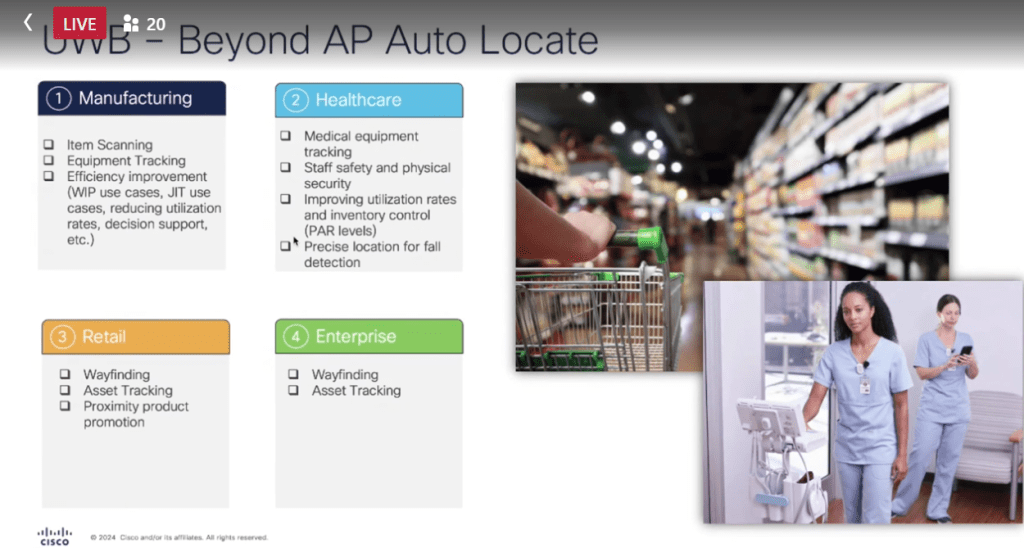
*Also in progress: APIs for 3rd party integration to use this data, but it’s not a thing quite yet. They have no plan to have the data pulled directly from controller at this time. It would all come from spaces and smart spaces.
There is currently no hard-set number of how many devices can send and receive location services at a time. It’s in the hundreds right now. They are establishing guidelines for things like this, AP-to-AP positioning, and AP-to-Client positioning.
Next came some updates on Cisco and AI.
Cisco has implemented a better, more automated Radio Resource Management which leverages AI to be more efficient, cause less disruptions, and greatly reducing changes during peak hours.
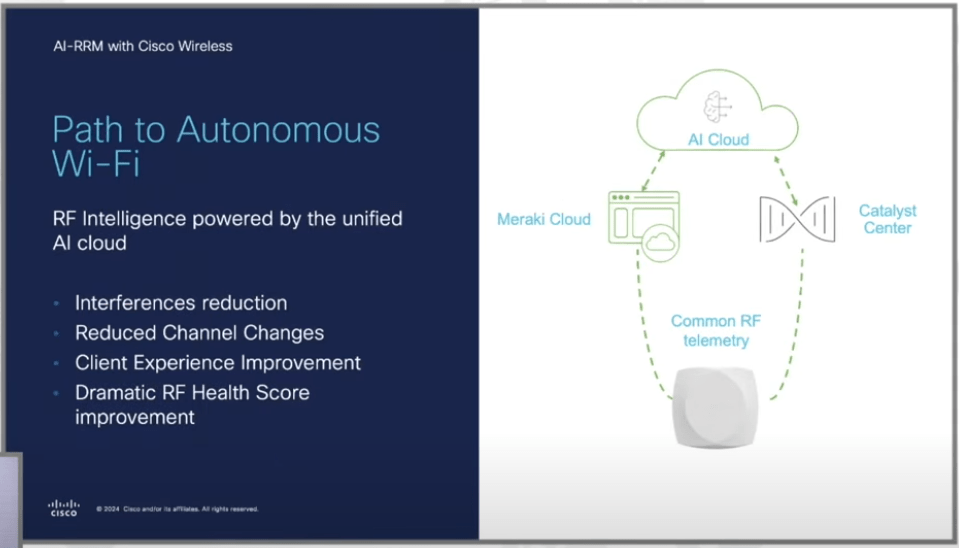
With all the new smart feature of AI-RRM I had to ask, “does this mean it will turn off unused 2.4GHz radios?” and the answer was yes! This is a personal favorite of mine because it was mentioned years ago as a sales feature to our management but did not really work in practice and it was a very wanted feature by me for our environment.
Someone at work took a screenshot of me being happy with the answer haha.
The boo-urns of this is that a few months ago our institution decided not to move to Cisco wireless so I won’t get to use the feature, but I’m excited it will be available for others 😊
Well, it would seem I had more to say about the Cisco presentation then I originally thought so I will pause here and make a Part 2 to cover the next presentation which was Nile’s Network as a Service.

 Let's Ginger-Fi it!
Leave a reply to My first MFD, featuring Cisco and Nile – Tech Field Day Cancel reply