
Around 2 weeks ago the awesome Mr. Keith Parsons made a great post about wireless to wired bridges. If you haven’t had a chance to read it yet, you can find it here.
I had been thinking about some issues at work with expensive IoT/research devices arriving on campus and not being able to do enterprise wireless (or in some cases our version of enterprise) and the client being unwilling/unable to wire them.
Ever wake up 20mins before your alarm and have your brain just kind of think of good ideas/put things together while you’re half asleep? Well, that’s what happened to me last weekend.
My brain started thinking about Keith’s post and how there are lots of small, travel router size devices that can do ethernet to wireless bridging. There must be some that can do it with an enterprise network!
I honestly had never even though about it before. Things either do enterprise or they don’t.
It took more digging than I would have expected, but the first brand that came up from my searching was Silex Technology. They offer a few options: https://www.silextechnology.com/connectivity-solutions?services=network-systems-solutions&type=ethernet-to-wi-fi-bridge
Now I’m up in Canada, so the prices where you are may differ greatly and I’m not adding in the taxes, but the Silex models available to me were $400-$500. These are very robust looking devices with a large number of capabilities aside from what I was looking for so I can understand the prices but I wasn’t willing to buy one to play with haha.
The next ones I found were made by Lantronix. I was familiar with this brand as we used another one of their products a lifetime ago to be able to remotely power cycle devices.
The model I found most interesting was the Lantronix SGX 5150. https://www.lantronix.com/products/sgx-5150/
This also comes in a medical device version https://www.lantronix.com/products/sgx-5150-md-medical-device-gateway/
It again looked very robust with many capabilities, but when I looked at the prices, the standard 5150 came in at around $700 and the MD version $900….but for some reason (maybe an older version?) they were being sold on Amazon for $135.
I know, seems too good to be true.
But did I buy one? Yes 😊
https://www.amazon.ca/-/fr/Lantronix-Passerelle-802-11A-2Xrs232-Sgx5150202us/dp/B01N8ZHC01?source=ps-sl-shoppingads-lpcontext&ref_=fplfs&psc=1&smid=A1MITH51ANPY7O
The quick start function made connecting to the enterprise Wi-Fi pretty easy.
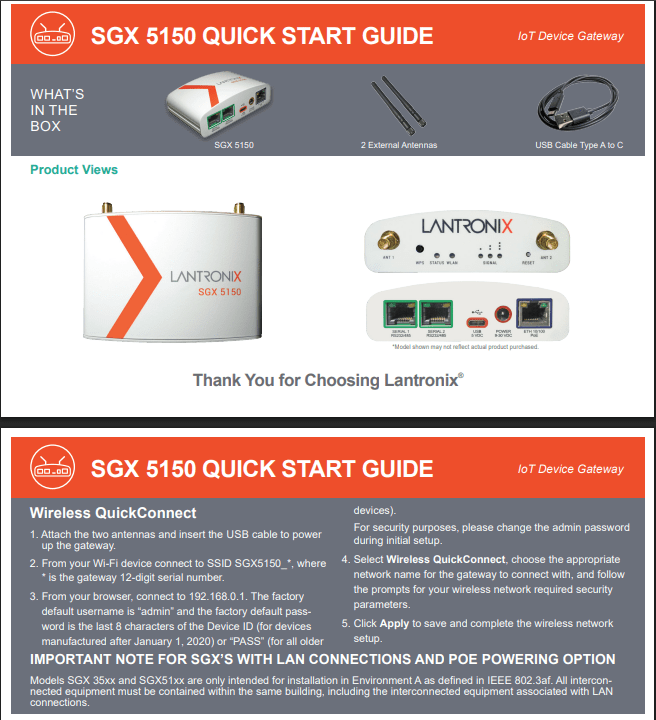
After connecting the SGX 5150 to our enterprise wireless network, I plugged a very old TV into it via the ethernet port. It worked! The TV that can not do wireless at all had one of our wireless IPs listed in the network info.
When I looked in the wireless controller I could even see the mac address and client info of the wired TV. This was good to know for accounting and troubleshooting.
The SGX 5150 has a large number of additional options that I haven’t had a chance to get into because they fell outside my planned testing.
I did notice it had a reset button on the back which seemed frightening at first (people do peoply things) but then found where you are able to disable the reset button in the GUI. This ability is a well thought out feature.
Now that I knew these devices were a thing and could be easily purchased, I kept digging to see if there were more consumer friendly options out there. The average client here isn’t going to know to look at brands like Lantronix and Silex, and they would most certainly be frightened away by the price for connecting their smaller devices, but some may know to look at brands like GL.iNet. Which was the next model I found that may have an enterprise wireless to ethernet bridge option.
It again took a bit of digging. Many of the models claimed they could connect to enterprise wireless networks, but most were dependent on the software version. Since I was looking for something the average user could just buy and use with no fuss I kept looking. After a while I found a model were all versions of it seemed to work. The Slate model.
There are 3 tiers to the Slate model by GL.iNet. Top end to bottom they are:
The Slate 7 (GL-BE3600) – $200
The Slate AX (GL-AXT1800) – $140
The Slate Plus (GL-A1300) – $98
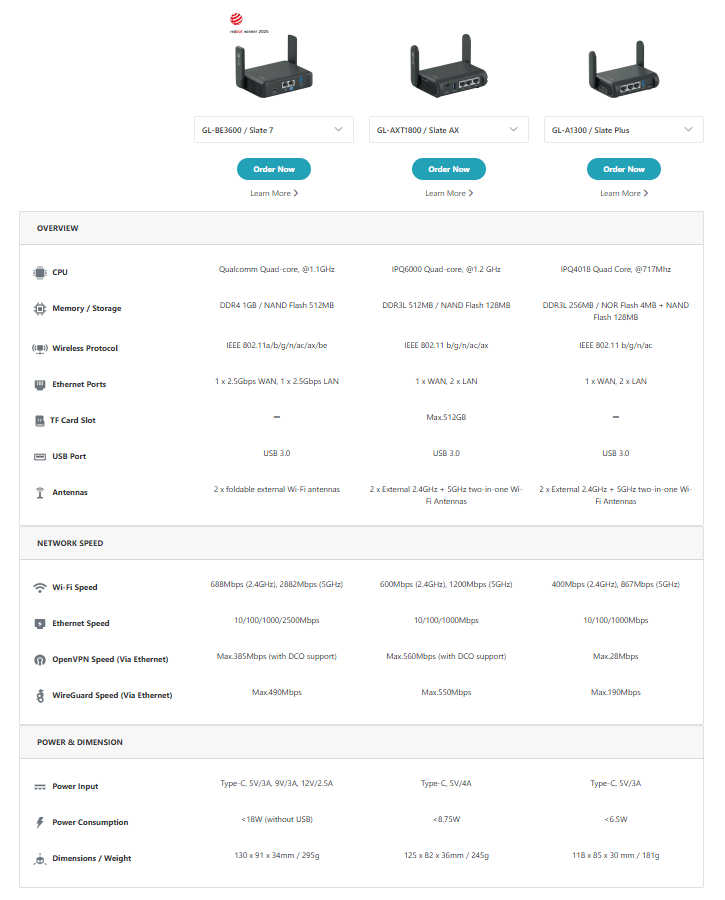
I bought the Plus thinking the least capable device would be the most likely to fib 😏
I was surprised by how easy it was to use. Powered it on, connected to it’s broadcasted network, entered the temp password on the device, reset the password on the prompt (right away), connected to our enterprise network and my ethernet only connected device was on our enterprise Wi-Fi network. Easy peasy.
The Slate Plus also has lots of other features and capabilities I haven’t had a chance to dig into much yet. You can find them here:
https://docs.gl-inet.com/router/en/4/user_guide/gl-a1300/
I again looked into the controller to see what device information was showing, and in this case, all the device information was for the GL-A1300. The wired device was displaying a private 192.168.x.x IP from the GL-A1300.
So, know we know we can, but should we?
That always seems to be the question. Especially in a BYOD environment.
You want to help people, but you have to keep things safe.
If you use something like this to connect a large, expensive piece of research equipment, what’s to stop someone else from using them on random things you don’t want on the network? Because when one person finds out, everyone finds out.
And if you do allow them, who manages them? The user becomes responsible? The security team? The network team? The one and only wireless person who truly does want to help but in no way has the time?
At least we know they are an option now. Or something to keep an eye out for 😉
 Let's Ginger-Fi it!
Leave a comment