
I have been using Mist as my home Wi-Fi network and my testing network for about 4 years now. It is super easy to use and manage.
One of the features I really enjoyed (and you may also) was the ability to set up a time manages SSID. I have 3 kids and this was a life saver at bedtimes and early mornings before school.
Now as many of you know, kids are smart. We had timers set up on their devices, but they kept figuring out how to unlock them. So, as an added deterrent I set up a kids network at home and through the Mist GUI, was able to set time limits for this SSID.
They make this very easy to do:
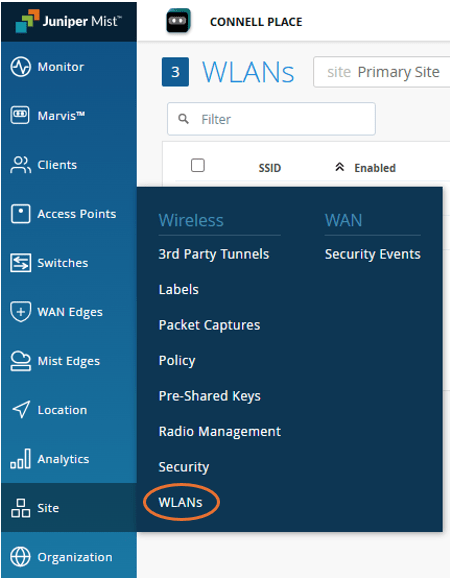
In your Juniper Mist portal, choose Site > WLANs
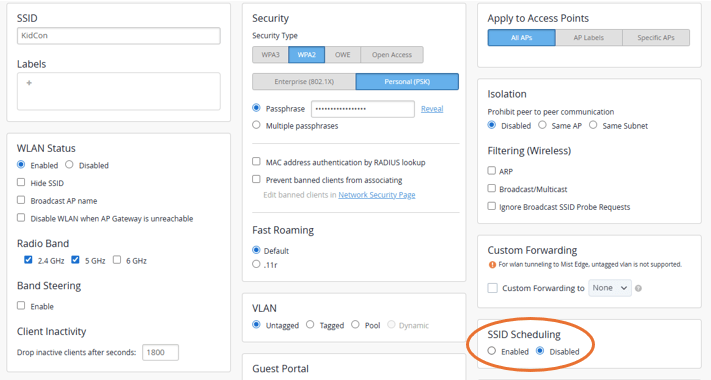
Choose the existing SSID you would like to add scheduling to or create a new SSID. On the right side of the screen about halfway down you will see the SSID Scheduling option. Click enable.
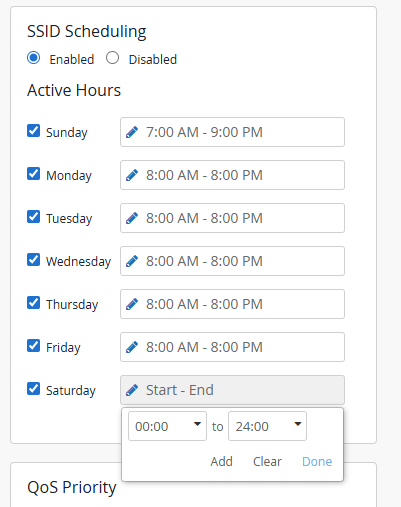
After this you can select the days and times you would like to have the SSID enabled.
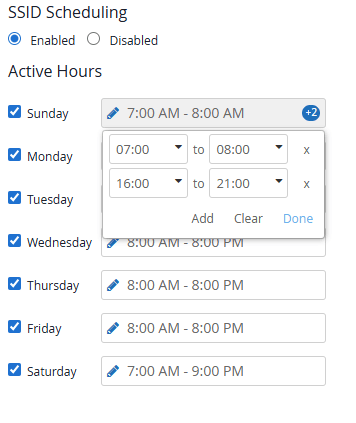
You can also add more than one start and stop time for each day if needed.
This 100% stopped them from even trying to unlock their devices since not being able to sneaky watch shows made it less fun. Mornings and bedtimes became easier.
A few years later….
The oldest two were recently given cell phones with data so it now makes the Wi-Fi shutdown more helpful for the youngest than them. We did also figure out that some mobile carriers let you set time limits for data on cell phones as well. Though that might also helpful for anyone out there trying to limit their own or their children’s data usage😊
 Let's Ginger-Fi it!
Leave a comment